Calendar
Your day or week, with your own calendars beside Nifty's tasks, projects and key dates.
On this page
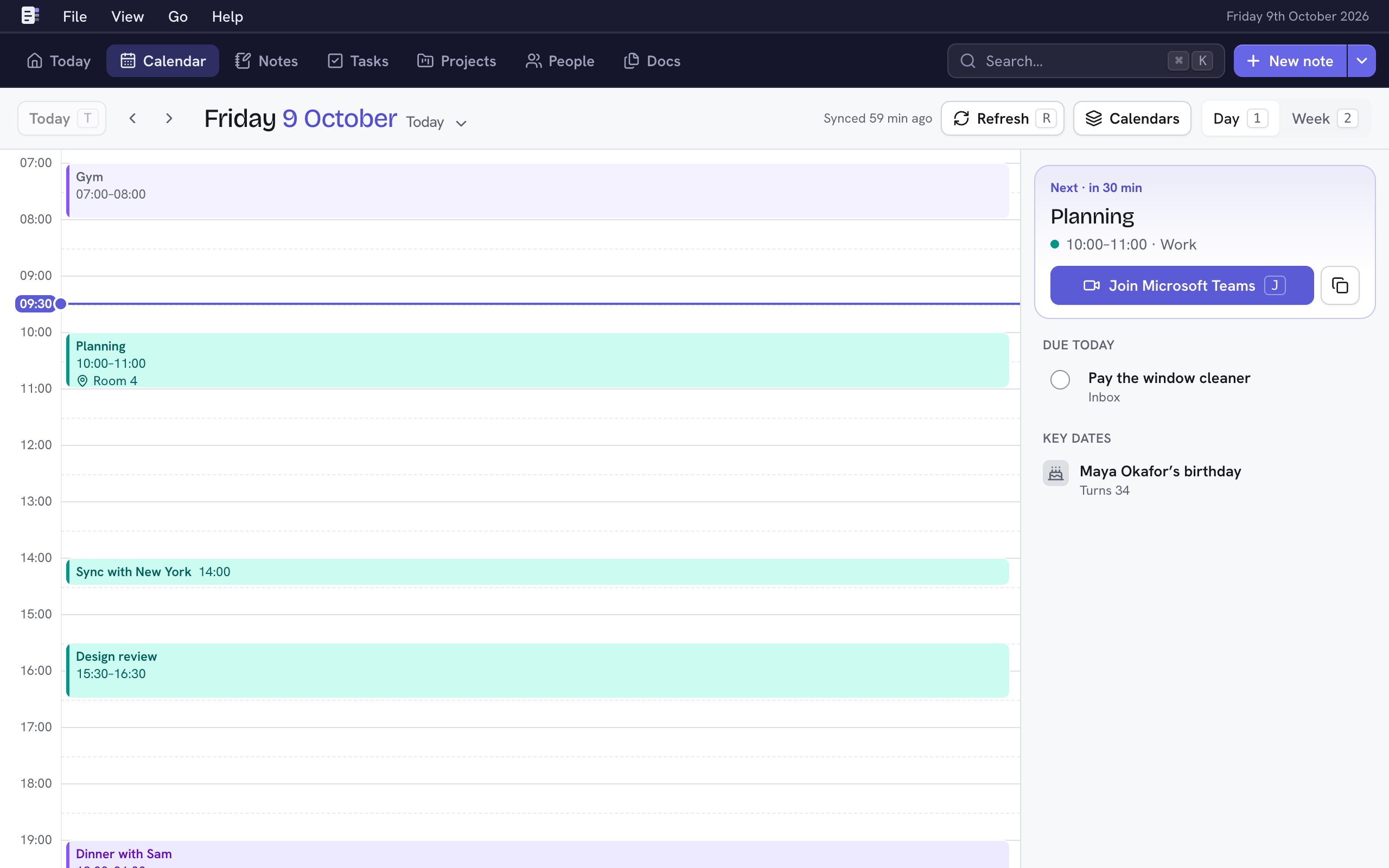
Calendar shows a day or a week: events from the calendars you add, plus Nifty's own dates (tasks due, project deadlines and key dates). Press G then C from anywhere to open it.
Nifty only reads your calendars. It never changes them.
Add a calendar
Nifty reads any calendar with an iCal (.ics) address: Google Calendar, Outlook, iCloud and others.
- Open Settings → Calendars and choose Add calendar (N).
- Paste the Calendar address. Not sure where to find it? Open Where do I find it? for Google Calendar, Outlook and iCloud.
- Optionally give it a Name (blank uses the calendar's own) and a Colour.
- Choose how often to Check for changes every: from 15 minutes to daily.
- Choose Add calendar (⌘↵). Nifty checks the address, then shows its events.
A calendar's address works like a password: anyone with it can read your events. Nifty keeps it secret and shows only its host once saved.
To change or remove a calendar, choose ⋯ beside it, then Edit…, Sync now or Remove…. Removing one takes its events out of Nifty; the calendar itself isn't touched.
Get around
| Key | Does |
|---|---|
| 1 · 2 | Day or Week |
| ← · → | Previous or next day or week |
| T | Back to Today |
| D | Choose a day from the month (or choose the date at the top) |
| R | Refresh: check every calendar for changes now |
| J | Join the meeting that's on now or next |
Day shows the hours, and beside them the day's all-day events, tasks due, project dates and key dates. Tick a task there to complete it. Week shows seven days; choose a day's heading to open it. On a phone, Week is a list.
Events and meetings
Choose an event to see its time, place, guests and description. If it has a video call link (Zoom, Google Meet, Microsoft Teams and others), Join opens it and the copy button copies the link.
On today, the card at the top of Day shows the meeting that's on now, or the next one within the hour, with Join (J). Today's Meeting tile shows it too. See Today.
Guests who are your people
A guest who's one of your people shows with their photo, and choosing them opens their page. Nifty matches a guest by an email address under their Details, or by name when only one person has it. Their page then shows their next meeting under their name, and an Upcoming meetings tab for the next 60 days.
A guest not matched? Add the email address they use for invites to their Details.
Show or hide calendars
Choose Calendars at the top to tick which calendars to show, and which of Nifty's own dates: Task deadlines, Project dates and Key dates. This is remembered on each device, so your phone can show less than your desk.
When a calendar won't sync
The status at the top ("Synced 5 min ago") says when Nifty last checked. If a calendar fails, a warning there names it and links to Settings → Calendars, which says what went wrong. If its address has changed, choose Change address… there and paste the new one.