Search
Press ⌘K to find anything, go anywhere, or start something new.
Press ⌘K (CtrlK on Windows and Linux) or /, type a few letters, and press ↵. Or choose Search… at the top.
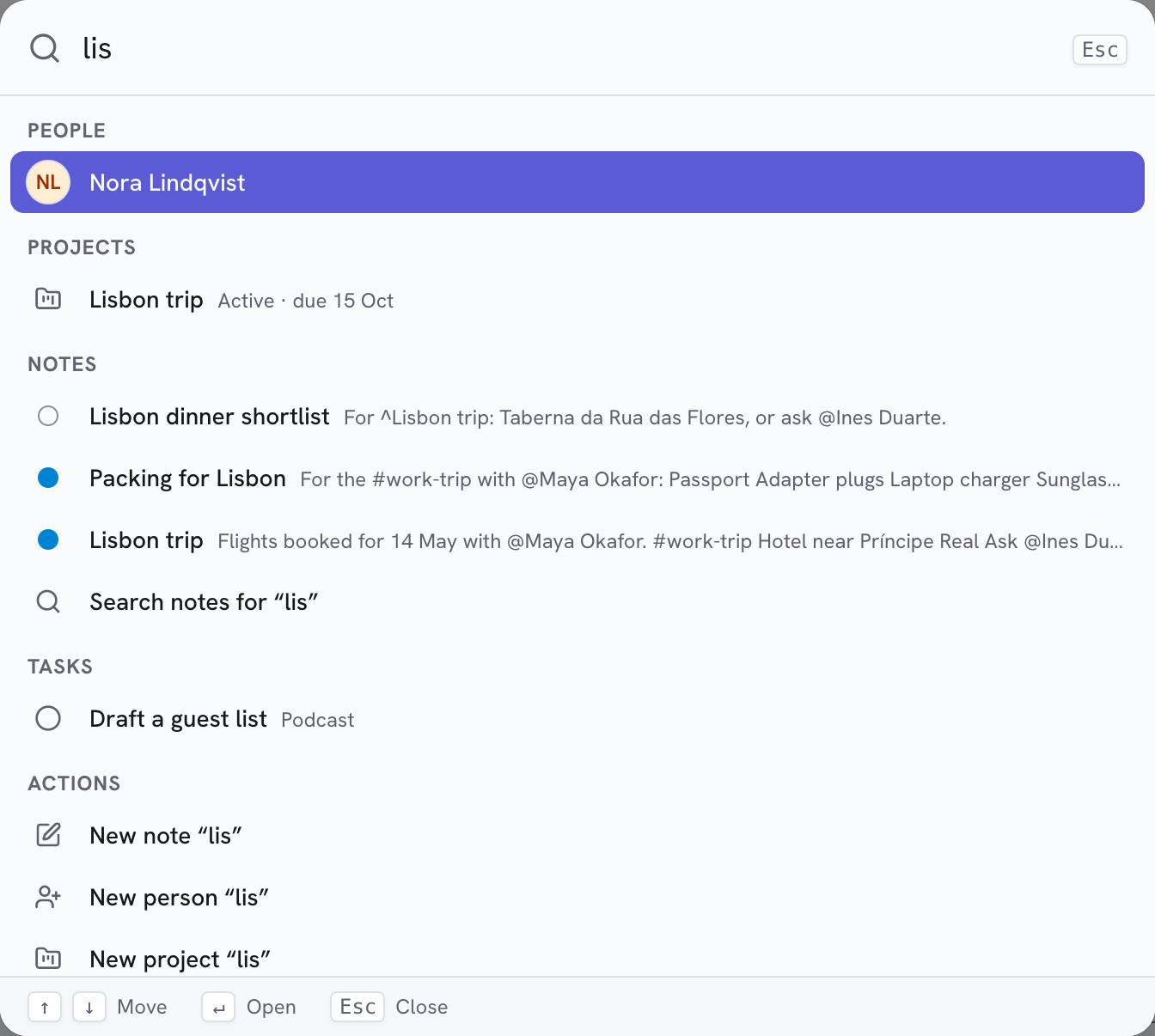
What it finds
Results come in groups, best first:
| Group | Finds |
|---|---|
| People | Names and contact details |
| Projects | Names, references and descriptions |
| Notes | Titles, tags, categories and text |
| Tasks | Titles |
| Documents | Names |
| Go to | Areas, settings, task lists and folders |
| Actions | New note, person, project, task or list; Nifty help; Keyboard shortcuts |
Type the start of any word: lis finds "Lisbon trip". Accents and capitals don't matter (jose finds José), and
names forgive a typo.
Move around
- ↑ ↓ move through the results, across groups.
- ↵ opens one.
- Esc closes search. Press ⌘K again to select what you typed.
Start something from what you typed
The actions use your words: type Call the plumber, then choose New task “Call the
plumber”. It opens filled in, ready to save.
Search inside notes
Under the note results, choose Search notes for “…” to see every matching note in Notes.
Tip:
Type a place's name to jump there: tok goes to API tokens, logbook to the Tasks Logbook.